Browse categories
English
$
USD
Connect to your AI



Are you manually copying leads from Google Forms or website forms into your CRM or Google Sheets?
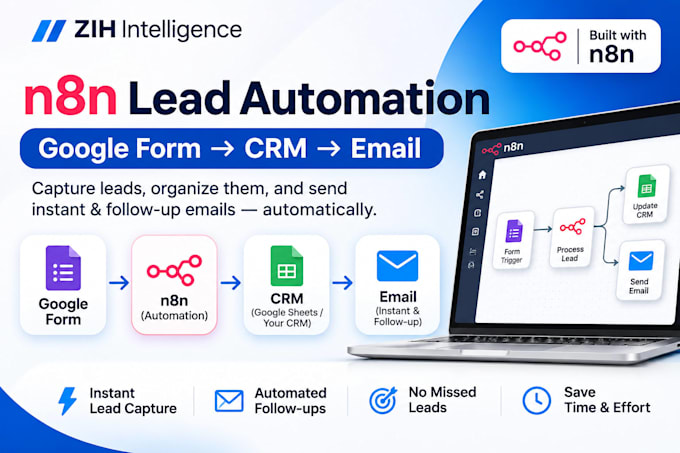
I will build a reliable n8n automation that captures new leads automatically, updates your CRM or Google Sheets, and sends instant email notifications to you or your team.
I can automate:
Google Forms to CRM
Google Forms to Google Sheets
Website form lead capture
CRM lead creation and updates
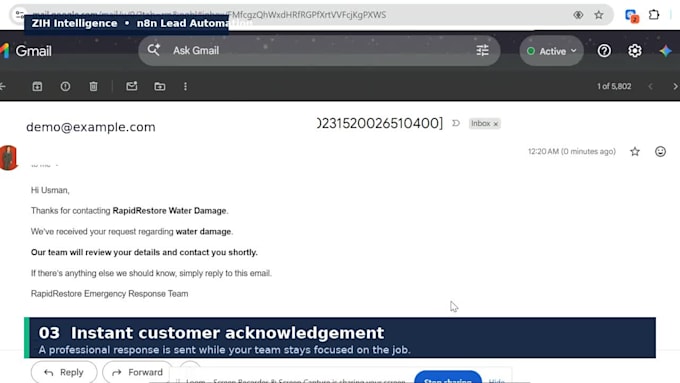
Instant customer email responses
Team email alerts and notifications
Automated lead follow-ups
Duplicate lead checks
Webhook and API integrations
Lead status tracking
A typical workflow can be:
Google Form n8n CRM / Google Sheets Email Alert Follow-Up
My goal is to replace repetitive manual lead entry with a simple, reliable workflow that saves time, improves response speed, and helps prevent missed leads.
Every workflow is tested end-to-end before delivery.
Please message me before ordering if your CRM requires custom API access or your workflow involves multiple systems.
AI Automation Specialist ,n8n Workflow Designer
Languages
Can you connect Google Forms directly to my CRM?
Yes. If your CRM has a supported integration, webhook, or API, I can connect Google Forms through n8n and automatically create or update lead records.
Can you use Google Sheets instead of a CRM?
Yes. I can automatically save new form submissions to Google Sheets, update existing records, and trigger emails or other workflow actions.
Can the automation send an instant reply to a new lead?
Yes. The workflow can send an automated acknowledgement to the customer and a separate notification to your team.
Can you add automated follow-ups?
Yes. Standard and Premium workflows can include timed follow-ups based on the lead status and your required business logic.
Can you connect website forms as well as Google Forms?
Yes. Website forms can usually be connected using webhooks, APIs, or available integrations.
What do you need before starting?
I need the form you want to automate, the destination CRM or Google Sheet, the actions that should happen after submission, and access to the required integrations. Please do not send passwords in Fiverr messages.