Browse categories
Explore
Fiverr Pro
English
$
USD
Zoho One Expert: CRM, Automation, Creator and Business Ops
Level 1
Has met certain performance criteria and shows strong potential in the marketplace.
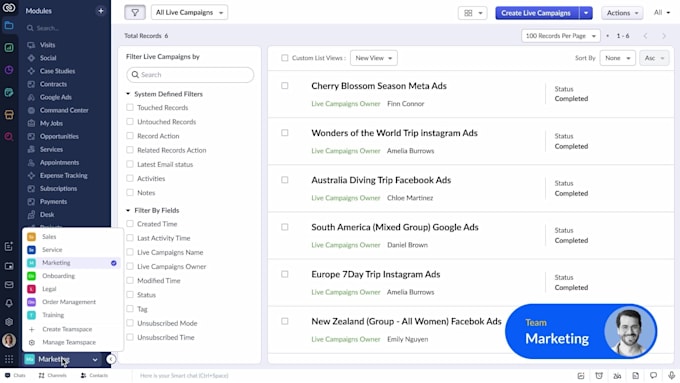
Transform your business with Zoho CRM Plus - The Smart All-in-One Platform for Sales, Marketing & Customer Service
Are you tired of juggling separate tools for leads, campaigns, and support? Do your teams work in silos, data gets lost, and customer follow-ups slip through the cracks?
I'm here to fix that.
I'm a certified Zoho CRM Plus implementation specialist, and I help businesses like yours:
What you'll get:


Software:
Zoho
Do I need to purchase the Zoho CRM Plus license before you start?
Yes, you’ll need an active Zoho CRM Plus subscription (or yes we can help you set one up) before we begin. Getting your license ready helps us start immediately with configuration and automations.
How long will the implementation take?
It depends on the package you choose and your requirements. For our Basic package it’s usually 3 days, Standard around 5 days, and Premium up to 7-10 days. Complex automations or multiple integrations may extend the time slightly.
What data do you need from me to get started?
You’ll need to provide any existing data (leads, contacts, accounts) in Excel/CSV format or from your current CRM, a list of users and their roles, and information about key workflows you’d like automated. This helps us tailor the setup correctly.
Will my team get training on the new system?
Yes. All packages include training. For example, the Basic package includes a live 1-hour session, while the Premium includes full team training and follow-up support. We’ll ensure your team is comfortable using the system.
Do you handle integrations with other tools (e.g., email, website forms, payment gateways)?
Absolutely. In the Standard and Premium packages we include integrations such as email/website form automation, third-party tools, and custom workflows. If your tool is unusual, message me and we can check compatibility.
What happens after the project is delivered?
After delivery we provide a support period per package (e.g., the Premium offers 1-month follow-up support). We also provide documentation of the setup, and you can add ongoing support as a Gig Extra if needed.
Can you migrate data from another CRM into Zoho CRM Plus?
Yes — we offer data migration as a Gig Extra (or included for some packages). We’ll map your old data fields, clean the spreadsheet, and import it into Zoho CRM Plus to ensure a smooth transition.
What if my business has unique workflows not standard in Zoho CRM Plus?
No problem — the Premium package includes custom automations and third-party integrations to adapt to your unique workflow. For very unique setups we can create a custom offer.