Browse categories
English
$
USD
Connect to your AI
OBS Studio Stream Setup Expert
PLEASE MESSAGE ME BEFORE PLACING YOUR ORDER
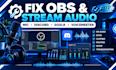
Are you experiencing OBS audio problems, microphone issues, Discord audio problems, or incorrect audio routing? I will help you fix and optimize your streaming audio setup for clear, reliable sound.
My services include:
Whether your microphone is not working, your Discord audio is missing, or your stream has unwanted noise, echo, or audio routing problems, I will help identify the issue and configure your setup correctly.
I focus on clean sound, balanced audio levels, proper routing, and reliable performance for streaming, gaming, podcasting, and recording.
Ready to fix your streaming audio? Send me a message and tell me what problem you're experiencing.

Software:
OBS Studio
Platform:
Twitch
•
YouTube
•
Mixer
•
Kick
Purpose:
Gaming
•
Music
•
Lifestyle
•
Business
•
News
•
Streamshare
•
Webinar
Can you fix my microphone if it is not working in OBS?
Yes. I can troubleshoot microphone detection, input settings, filters, levels, and audio routing in OBS.
Can you fix Discord microphone and audio problems?
Yes. I can help with Discord input/output settings, microphone issues, voice chat, and audio routing.
Do you work with GoXLR and Voicemeeter?
Yes. I can troubleshoot and configure GoXLR, Voicemeeter, and other streaming audio setups.
Can you help with Elgato microphones or RØDECaster?
Yes. I can help configure and troubleshoot supported Elgato and RØDECaster audio setups.
What do you need from me to start?
Tell me what audio problem you're experiencing and provide any relevant screenshots or setup details.
