Browse categories
Explore
Fiverr Pro
English
$
USD
Whatnot and Streaming Specialist, OBS, FIFA, Stream Deck
Want to stream on Twitch, YouT_ube, and Kick at the same time? I will set up OBS multistreaming so you can broadcast your content to multiple platforms with a clean, stable, and professional setup.
I can help with:
Whether you are a gamer, streamer, content creator, or live seller, I will configure OBS based on your computer, internet connection, and streaming requirements.
I'll make sure your OBS streaming setup is properly configured for smooth broadcasting and help you understand the settings you need to go live confidently across your chosen platforms.
Ready to start multistreaming? Please message me today and let's get your OBS setup ready for Twitch, You-Tube, and Kick!

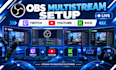
Software:
OBS Studio
Platform:
Twitch
•
YouTube
•
Kick
Purpose:
Gaming
•
Music
•
Lifestyle
•
Business
•
News
•
Streamshare
•
Webinar
Can you set up OBS to stream to Twitch, YouTube, and Kick?
Yes. I can configure OBS multistreaming for Twitch, YouTube, Kick, or your preferred platforms.
Do I need a powerful PC for multistreaming?
Not necessarily. I’ll configure the OBS settings based on your computer hardware and internet connection.
Can you configure my bitrate, FPS, and resolution?
Yes. I can optimize your OBS output settings for your PC, internet speed, and target platforms.
Can you fix OBS streaming or connection problems?
Yes. I can troubleshoot common OBS, encoder, audio, and streaming connection issues.
Can you set up my microphone and stream audio too?
Yes. I can configure your microphone, desktop audio, monitoring, and other audio sources as part of the setup.
