Browse categories
English
$
USD
Connect to your AI
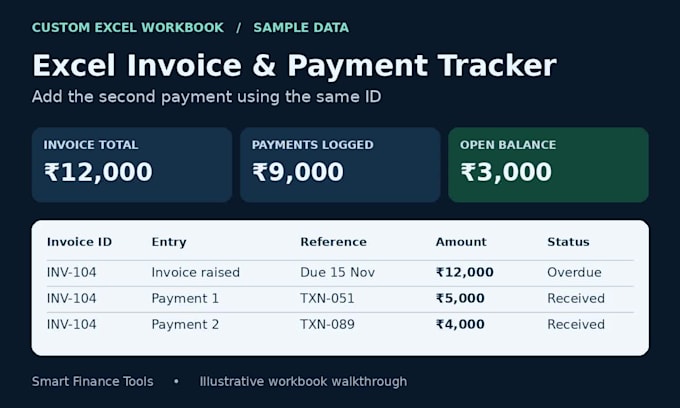
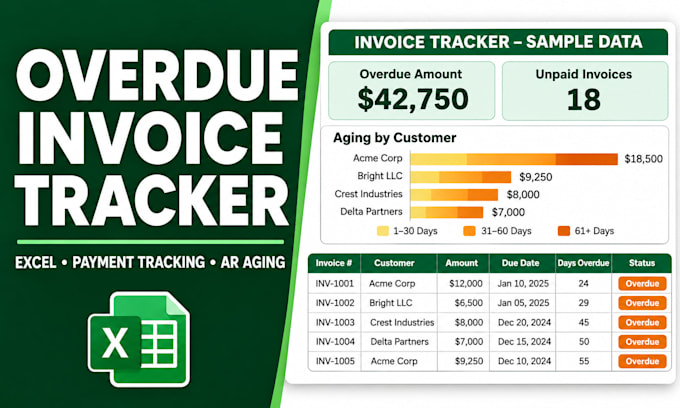
See which invoices are due, overdue, or paid in one editable Excel workbook. I will build a tracker around your invoice fields and due-date rules. Invoice & Due Date Log includes a one-sheet log and quick-use guide. Payment Tracker adds payment status dropdowns and overdue flags. Receivables Dashboard adds a KPI summary and filters. For multiple payments against one invoice, send a fictional example through Fiverr before ordering so I can confirm the setup. Please include your Excel version and required columns.

Platform:
Excel
Development technology:
Excel
Expertise:
Formatting
•
Formulas
•
Functions
•
Dashboard
•
Data validation
Which Excel version do you support?
Standard .xlsx files are intended for current desktop Excel. Tell me about version or web-use limits before ordering.
Can you decide which invoices are overdue?
I apply the due dates and status rules you provide. I do not make accounting decisions or interpret missing information.
Can you connect my bank or accounting software?
No. This Gig builds a standalone Excel template. No bank connection, account login, or remote access is required.
Can you include macros?
No. The packages use standard formulas, filters, and data validation only; they do not include macros or external connections.
Can you enter my invoice data?
No. These packages provide the reusable template only and do not include data entry or processing of real invoices.
Do you guarantee collections or cash flow?
No. The workbook organizes tracking information only. It cannot guarantee collections, payment timing, or cash flow results.