Browse categories
Explore
Fiverr Pro
English
$
USD


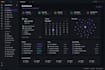
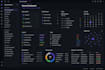
Is your Obsidian vault becoming a collection of scattered notes that are difficult to navigate? Spending too much time searching for information instead of getting work done?
A well-designed Obsidian workspace should help you think clearly, stay organized, and access everything you need in secondsnot create more confusion.
Whether you're managing projects, research, clients, documents, study materials, or building a second brain, you'll receive a workspace designed around your workflow and goals.
What you'll get:
Perfect for students, researchers, professionals, developers, consultants, businesses, and anyone who wants an efficient knowledge management system.
Every workflow is different, so every solution is customized. If you have a specific idea or need features beyond the packages, send me a message before ordering, and we'll create the right solution for your workflow.
Canva Design Expert
Languages
Can you customize my existing Obsidian vault?
Yes. Whether you already have an Obsidian vault or you're starting from scratch, I can organize, redesign, and optimize it without affecting your existing notes.
Can you build a custom Obsidian dashboard?
Absolutely. I can create a custom Obsidian dashboard with Dataview, navigation, project tracking, task management, and quick-access widgets tailored to your workflow.
Can you create a Second Brain or PKM system?
Yes. I can build a personalized Second Brain (PKM) using PARA, Zettelkasten, or a custom knowledge management structure based on how you work.
What types of Obsidian workspaces can you create?
I can create workspaces for project management, research, business documentation, client management, study notes, personal productivity, knowledge management, and more.
Can you install and configure Obsidian plugins?
Yes. I can install and configure the plugins your workspace needs, including Dataview, Tasks, Calendar, Templater, Kanban, and other compatible plugins.
Will my dashboard work on Windows, Mac, and Linux?
Yes. Obsidian is cross-platform, and your workspace can be used on Windows, macOS, and Linux. Mobile compatibility can also be considered where applicable.
I don't know exactly what I need. Can you help?
Of course. Simply describe your workflow or the problem you're trying to solve, and I'll recommend the best Obsidian dashboard and workspace for your needs.
Can you recreate a dashboard from a screenshot or reference?
Yes. If you have a reference image, existing dashboard, or inspiration, I can build a similar layout customized for your workflow.
Can you add Dataview tables and automation?
Yes. I can create Dataview queries, dynamic dashboards, automated note organization, and custom views to help you manage information more efficiently.
Should I contact you before placing an order?
Yes. Every Obsidian workspace is different. Sending a message first allows us to discuss your goals and ensures you get the right solution without paying for features you don't need.


