Browse categories
Explore
Fiverr Pro
English
$
USD


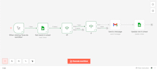


I will run email campaigns from your Google Sheets on your behalf using the Gmail account you provide. You can use your own Gmail or a temporary/dedicated Gmail. This ensures emails come directly from you to the recipients.
What I offer:
Certified WordPress and Excel Expert, University Assistant Manager
Languages
Which email services are supported?
Gmail (Google Workspace) is fully supported.
How many sheets and rows can I use?
Depends on the package: Basic: 1 sheet, 50 rows Standard: 1 sheet, 100 rows Premium: 2 sheets, 100 rows each Custom: As per requirement or deal.
Can I use dynamic CC & BCC?
Yes, both Standard & Premium packages support this feature.
Can I include HTML email templates?
Yes, included in the Premium package (up to 20 lines). A write-up with instructions is needed from you.
Will the sheet mark emails as sent?
Yes, every email sent is automatically marked as “Email Sent”.
Why do you need access to my Gmail and is it safe?
I execute the emails on your behalf, and Gmail access ensures emails appear from you, not from anyone, which is professional. Anyway, for safety, I recommend using a temporary or dedicated Gmail account. Access is only needed during the service and is not stored.
Can you work with excel file that I will share to you?
Yes, you can provide me with an Excel file, but I will import it into your Google Sheet and will completed work.


