Browse categories
Explore
Fiverr Pro
English
$
USD
Google Sheets automation with Apps Script, Excel dashboards, data cleanup
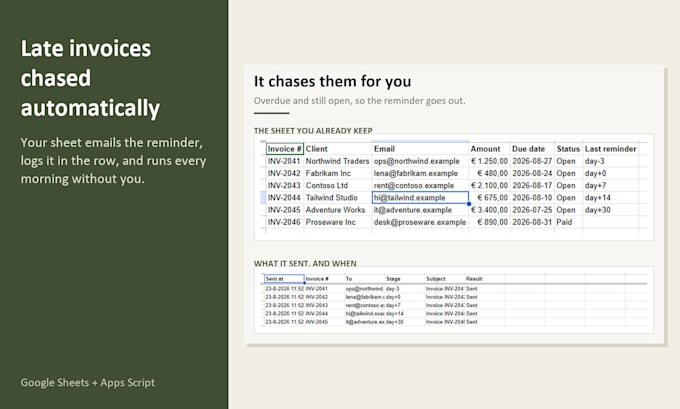
Your unpaid invoices sit in a spreadsheet and somebody has to remember to chase them. I set up your Google Sheet to do it: every morning it checks who is late and emails them a reminder on the days you pick, from your own address, without you.
WHAT YOU GET
Not a mail merge: it decides per row and writes the stage it sent on that row, so nobody gets the same reminder twice. A Log tab lists every reminder: who was reminded and when. If one row has a typo, the rest still go out.
PREVIEW FIRST
Nothing goes to a client until you press Run now or switch on the daily run. Send test to me emails you a marked copy of what a client would get. Nothing is installed on your computer and I never need your password: you copy the finished sheet into your own Google Drive.
WHAT YOU CONTROL WITHOUT CODE
Subject, message, sender name, which days before or after the due date a reminder goes out, and which statuses stop it. All on a Settings tab in plain words.
DEMO
Ask me for the working demo sheet to look through before you order.
You own the sheet and the script. No subscription. If it breaks within 14 days because of how I built it, I fix it.


Technology:
Excel
•
Google Sheets
Will this email my clients by mistake?
No. You can send yourself a preview first, and nothing goes to a client until you press Run now or switch on the daily run yourself.
Do you need access to my Google account?
No. I build it in a copy of your sheet and deliver that. You copy it into your own Drive and approve it there yourself. I never need your password.
Which email address do the reminders come from?
Your own Gmail or Google Workspace address, so replies come to you. Google allows about 100 reminder emails a day on a free Gmail account and 1,500 on Workspace.
Does it work with Excel?
It needs Google Sheets to run on a schedule. For invoices in Excel, I can set the sheet up so you paste in a CSV export and it finds the columns by name. Mention it before ordering.
Do I need to know code?
No. The wording, the reminder days, the sender name and which statuses are skipped are all on a Settings tab in plain words.
What happens after delivery?
You own it. No subscription, nothing to renew. If it breaks within 14 days because of how I built it, I fix it.