Browse categories
Explore
Fiverr Pro
English
$
USD



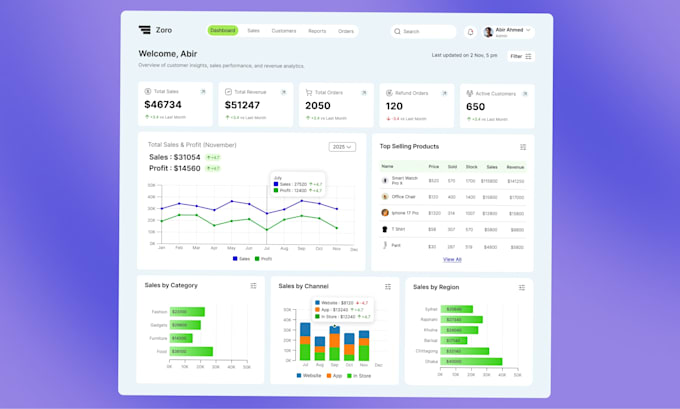
Hello! I'm Rafsan a dashboard UI UX designer with over 2 years of experience transforming complex data into clear, logical, and functional dashboards.
If you're here, you're looking for a dashboard design that helps you track business performance and make smart, data-driven decisions. That's a smart move.
An effective dashboard UI UX requires logical and functional charts that highlight the most important insights. Poor visualization can lead to misleading insights, bad decisions, and unnecessary development costs. That's why you need a dashboard-focused, logical, and data-driven dashboard UI UX designer.
Why choose me?
1) I prioritize logical and functional UX over aesthetics.
2) Each dashboard is custom-designed for the product type.
3) I analyze your data first to select the most effective charts.
4) I enjoy turning complex data into clear, actionable insights.
I do not provide development services. I only design UI (User Interface), and the final deliverable will be a Figma file. Feel free to message me before placing an order.
Lets create a dashboard UI UX that truly helps your business grow. Message me to discuss your project.
Please inform the freelancer of any preferences or concerns regarding the use of AI tools in the completion and/or delivery of your order.
Languages
What program do you use for Dashboard UI UX?
I use Figma to design modern, clean, and functional dashboard UI UX.
What information do you need from me to start the dashboard UI UX design?
1. What this dashboard is for? 2. What you want to achieve from this dashboard? 3. Who will use it ? 4. What type of data or KPIs you want to see? 5. Brand materials (like logo, fonts, color schemes) or Any sample or reference design. (if available)
What is your working process from sketch to handover for dashboard UI UX?
- My dashboard UI UX process is simple and effective: 1. Requirement analysis & understanding data 2. Wireframe / layout planning 3. High-fidelity dashboard design in Figma 4. Interactive prototype (if required) 5. Revisions based on feedback 6. Final handover with organized Figma file & asset
How much do you integrate prototypes in dashboard design?
I provide clickable interactive prototypes for dashboard UI UX using Figma.
How do you decide which charts or data visualizations to use in dashboard design?
I choose charts based on data type, business goal, and user needs. Every visualization in my dashboard UI UX is selected to ensure clarity, accuracy, and decision-making efficiency — not just visual beauty.