Browse categories
Explore
Fiverr Pro
English
$
USD


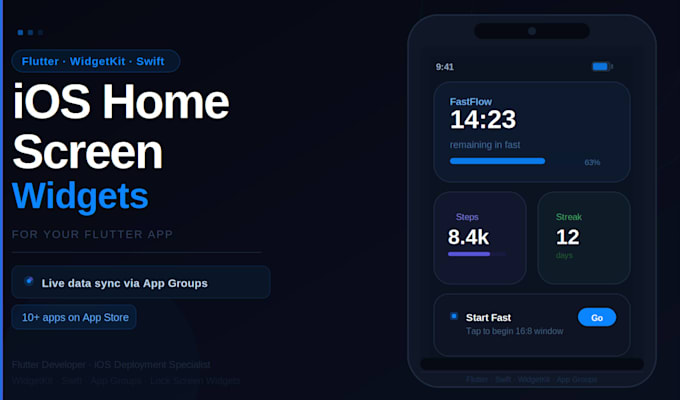
Most Flutter developers hit a wall when a client asks for a home screen widget. WidgetKit runs in Swift, not Dart. It has its own timeline system, its own rendering process, and syncing data between the Flutter app and the widget requires App Groups configured correctly in Xcode. Most developers either skip the feature entirely or deliver a broken widget that shows stale data.
I built exactly this in FastFlow, my fasting tracker app live on the App Store right now. Home screen widget, lock screen widget, bidirectional data sync with the Flutter app, three widget sizes. You can download it before ordering.
apps.apple.com/pk/app/fastflow-16-8-fasting-tracker/id6761664791
What I deliver:
- WidgetKit Swift extension set up in your project
- App Groups configured for Flutter to widget data sync
- Small, medium, and large widget sizes (Premium)
- Lock screen widget (Premium)
- Timeline provider with correct refresh logic
- Tested on real iOS device before handover
Message me before ordering with your Flutter project details and what data the widget needs to display.
Flutter Developer, RevenueCat, Firebase, App Store Specialist
Languages
Do I need to provide my Flutter project?
Yes. I work directly inside your existing project. Share the repository or a ZIP file when you message me.
Does this work on Android too?
Android home screen widgets use a different system. Message me if you need both platforms and I will quote separately.
My widget needs to show live data from Firebase. Is that covered?
Yes, live data sync is included in Standard and Premium. The widget pulls data from the Flutter app via App Groups, which in turn syncs with Firebase.
What iOS version does this support?
WidgetKit supports iOS 14 and above. Lock screen widgets require iOS 16 and above.