Browse categories
English
$
USD
Connect to your AI

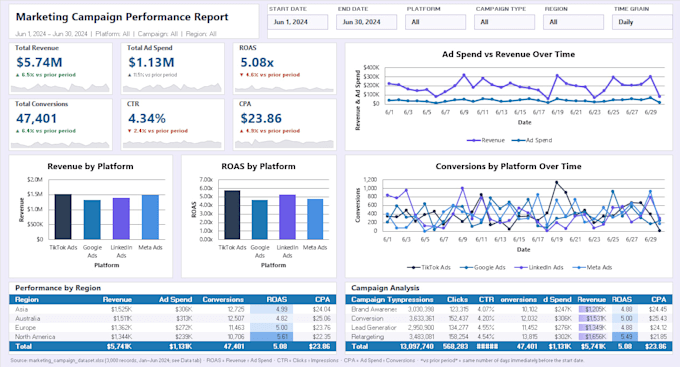
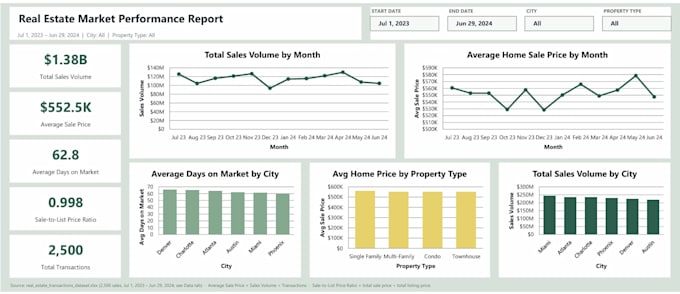
Need a clear, professional way to understand your business data?
I will transform your Excel or CSV data into a clean, interactive Excel dashboard designed to make performance trends, KPIs, and business insights easier to monitor.
Depending on your selected package, your dashboard may include:
My approach goes beyond placing charts in a spreadsheet. I focus on building dashboards that are accurate, organized, easy to navigate, and aligned with the decisions you need to make.
This gig is ideal for sales reports, operational tracking, marketing performance, financial summaries, inventory reporting, project tracking, and management reporting.
Please contact me before ordering if your project involves multiple data sources, complex data cleaning, VBA or macros, database connections, API integrations,
Data and Analytics Consultant
Languages
What do you need from me to begin?
Please provide your Excel or CSV files, the KPIs or questions you want the dashboard to address, any preferred colors or branding, and an explanation of who will use the dashboard.
Can you clean my data before creating the dashboard?
Yes. Light cleaning is included in the Basic package, with more extensive cleaning available in the Standard and Premium packages. Severely inconsistent or unstructured data may require an extra or custom offer.
Will I receive an editable Excel file?
Yes. You will receive the completed, fully editable Excel workbook. Any included formulas, PivotTables, charts, slicers, and Power Query steps will remain accessible.
Can the dashboard update when I add new data?
Yes, when the source structure supports it. I can build tables, PivotTables, formulas, and Power Query processes that allow the dashboard to refresh when new data is added. Please mention this requirement before ordering.
Do you create macros or VBA automation?
VBA and macros are not included in the standard packages because their complexity varies. Contact me with your requirements, and I can determine whether a custom offer is appropriate.
What counts as a revision?
A revision covers reasonable changes to the agreed dashboard, such as formatting, labels, colors, or adjustments to existing calculations. New data sources, pages, KPIs, or requirements are additional work.
Can you connect Excel to a database, API, or online platform?
Potentially, depending on the system, permissions, and available connectors. Database, API, CRM, and cloud-platform integrations require a project review and custom offer.
Will the dashboard work on Excel for Mac or Excel Online?
Standard formulas and charts generally work across versions, but some Power Query, PivotTable, macro, and interactive features can behave differently. For the most reliable experience, Microsoft Excel Desktop for Windows is recommended. Please tell me which version you use before ordering.
Will my business data remain confidential?
Yes. I will use the files only to complete the agreed project and will not include identifiable business data in my portfolio without permission. Please remove unnecessary sensitive or personally identifiable information before uploading files.