Browse categories
English
$
USD
Connect to your AI




Your support inbox is eating your day, and you can't hand it to anyone: handing over Gmail means handing over everything.
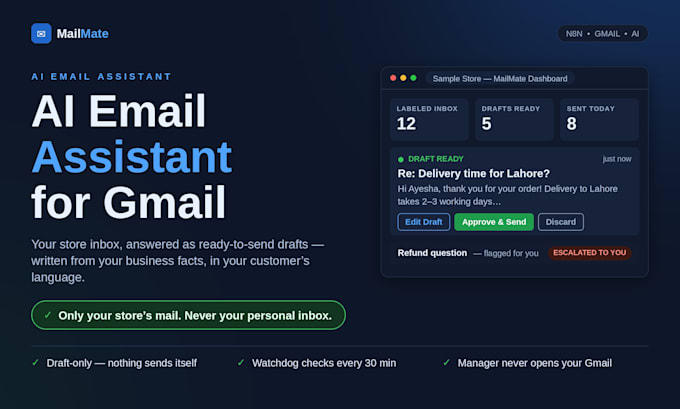
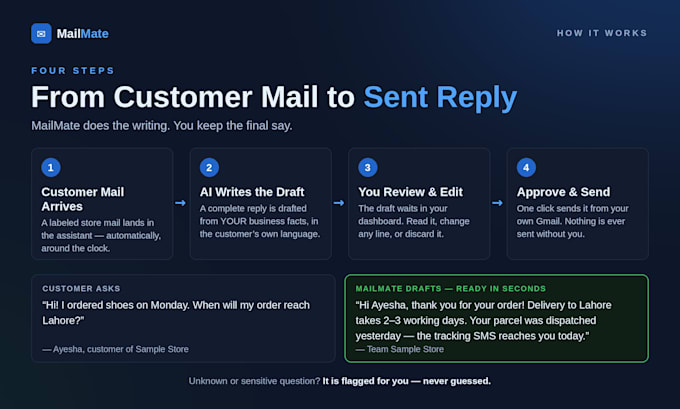
MailMate is an AI assistant that lives on ONE label of your Gmail. Every labeled customer mail gets a ready draft reply from your business facts, in your customer's language (English, Urdu tested live).
ONE LABEL, ONE CLEAN DESK
WHAT IT ANSWERS, WHAT IT NEVER TOUCHES
I never need your Gmail password. You connect it yourself with Google sign-in. Runs live on my own inbox; every feature tested, not promised.
Transforming Businesses with AI and API Integrations
Languages
Will it send emails automatically?
No — and that's deliberate. MailMate only drafts. Every reply needs a human to read it and press send in the dashboard, so a wrong answer can never reach a customer.
Do you need my Gmail password?
Never. You connect your Gmail yourself using Google's own sign-in. I never see or store your password — the same rule applies to your manager, who works only from the dashboard with their own access code.
Will my manager see my personal emails?
No. The dashboard is filtered by your business label — it only shows mail with that label: the inbox, the drafts and the sent replies for your store. Personal mail never appears there, and your manager never gets access to your Gmail itself.
What do I need before we start?
A Gmail (or Google Workspace) inbox, an n8n account, an AI API key (Gemini is my tested default; OpenAI or Claude work too) and a free Pinecone account for the knowledge base. If you don't have these yet, I'll give you simple step-by-step instructions.
Which languages can it reply in?
It replies in the customer's language. English, Urdu and Roman Urdu are tested and live; the same AI handles other languages the same way.
What happens when it doesn't know an answer?
It never guesses. The conversation is flagged with an escalation label, you get a warning in the dashboard, and the customer receives a polite holding reply until you answer.
What if the system stops working?
A watchdog checks it every 30 minutes, around the clock. If it stalls, the watchdog restarts it and alerts you by email and in the dashboard. It also verifies a thread is genuinely unanswered before calling it stuck — so you won't get false alarms.
Are there any running costs?
The AI usage runs on your own accounts and is pay-as-you-go — for a small store it's typically a few dollars a month. The dashboard and workflows themselves have no subscription from my side.