Browse categories
Explore
Fiverr Pro
English
$
USD
Your go to systems VA for SOPs, Google Workspace, automation and AI
I set up Gmail and Google Drive so your inbox sorts itself and your files have a clear home.
About me: I'm an IT support engineer who builds workflows and automations for teams.
What's included:
Basic: Gmail labels, 5 filters, 4 reply templates and 1 auto-reply
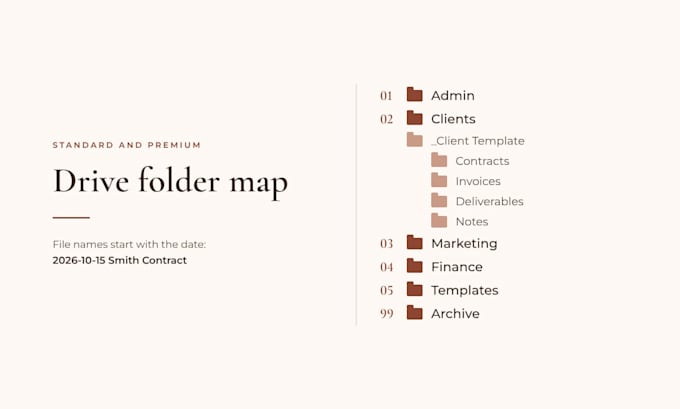
Standard: up to 10 filters and 10 templates, plus the Drive folder system below
Premium: everything in Standard, plus an intake Google Form linked to a Sheet, a Google Calendar booking page and a written SOP of your setup
Your Drive folder system:
- Up to 6 numbered main folders (like Admin, Clients, Finance)
- 1 ready-to-copy client folder set with up to 5 subfolders
- A one-page file naming guide
- Folder sharing set up for up to 3 people
- Up to 1 hour of sorting your existing files
How it works:
1. You fill out a short form about your business and tools. Standard and Premium add a 20-min intake call.
2. For Gmail, I use temporary delegate access if your account allows it, or send a ready-to-import filter file with a short guide.
3. For Drive, you share your main folder with me or add me to your shared drive.
4. I test everything, then we do a 30-min walkthrough call.


Purpose:
Business
Work model:
Project-based
Do you need my password?
No. For Gmail, I use temporary delegate access if your account allows it, or send a ready-to-import filter file with a short guide. For Drive, you share your main folder with me or add me to your shared drive.
Does this work with Google Workspace or only free Gmail?
Both. Free Gmail accounts can usually add me as a delegate. Google Workspace accounts get the filter file and guide, since Workspace only allows delegates inside your own organization.
Do you keep access to my accounts after?
No. Once your setup is done, you remove my delegate and Drive access. I show you exactly where on the walkthrough call.
My Drive is already a mess. Do you sort my existing files?
Standard and Premium include up to 1 hour of sorting existing files into the new folders. Larger cleanups can be added with a custom offer.
How is the booking page set up?
Booking pages live in your own Google Calendar, so I send a short screenshot guide. It takes about 10 minutes, and I check it with you on the walkthrough call. A free Google account gets one booking page.
Do you organize my whole Google Calendar?
Premium includes a booking page in Google Calendar. Full calendar setup (up to 3 color-coded calendars, shared with up to 2 people) is available as a Gig Extra.
What if I need more filters or templates?
Message me before ordering and I'll send a custom offer that fits your inbox.