Browse categories
Explore
Fiverr Pro
English
$
USD
Need clean and reliable audio for your OBS livestream?
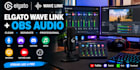
I will set up and optimize Elgato Wave Link with OBS Studio so your microphone, game audio, Discord, music, browser audio, and other sources are routed correctly.
What I can set up:
Perfect for gamers, streamers, podcasters, YouTubers, and content creators who want better control over their livestream audio.
Please contact me before ordering if you have a complex setup with multiple PCs, microphones, capture cards, or advanced audio routing.

Software:
OBS Studio
Platform:
•
Twitch
•
YouTube
•
Mixer
•
Bigo Live
•
Kick
Purpose:
Gaming
•
Music
•
Lifestyle
•
Business
•
News
•
Streamshare
•
Webinar
Can you set up Elgato Wave Link with OBS Studio?
Yes. I can connect Wave Link with OBS and configure your microphone, game audio, music, Discord, browser audio, and other sources for streaming.
Can you create separate Stream Mix and Monitor Mix settings?
Yes. I can configure Wave Link so you can control what you hear in your headphones separately from what your audience hears on the stream.
Can you route my microphone, game, Discord, and music separately?
Yes. I can organize your audio sources and route them correctly through Wave Link and OBS for easier control during your livestream.
Can you fix Wave Link audio not showing in OBS?
Yes. I can troubleshoot Wave Link inputs, OBS audio sources, device selection, routing, and signal-flow problems. A common issue is having the wrong Wave Link output selected or sending no signal to the Stream Mix.
Can you prevent my audio from playing twice or creating an echo?
Yes. I can check your monitoring and routing configuration and help prevent duplicate audio, echo, and feedback loops. OBS provides separate monitoring controls for audio sources.
Can you route Discord separately from my game audio?
Yes. I can configure separate Wave Link channels so Discord, game audio, music, microphone, and other applications can be controlled independently
Can you set up Wave Link for Twitch, YouTube, or Kick?
Yes. I can configure your Wave Link and OBS audio routing for your preferred streaming platform
What do you need from me before starting?
Please provide your Elgato Wave device/model, computer OS, microphone, headset/speakers, audio sources you want to route, streaming platform, and a description of the current audio problem. Never send passwords or private login information.
Can you optimize my audio levels for streaming?
Yes. I can balance your microphone and other sources and configure appropriate OBS levels to help avoid clipping and inconsistent volume. OBS recommends monitoring the mixer meters and watching for peaks approaching clipping.
