Browse categories
Explore
Fiverr Pro
English
$
USD
setup and optimize obs studio for streaming and recording
Level 1
Has met certain performance criteria and shows strong potential in the marketplace.
Highly Responsive
Known for exceptionally quick replies
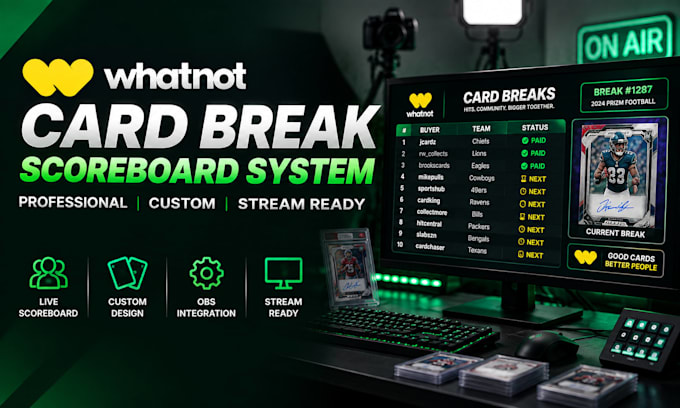
Your buyers shouldnt have to guess which teams are open, who owns each spot, or what happens next.
Turn your Whatnot stream into a cleaner, easier-to-follow live show with a branded Whatnot scoreboard, stream overlay, and Whatnot graphics built around your card break workflow.
Designed for sports cards, live auction sellers, and creators using OBS, every layout helps reduce visual confusion, keep break information clear, and give your stream a more polished, consistent look.
What you get
Whether you need one scoreboard or a complete Whatnot setup, the goal is simple: clearer breaks, stronger branding, smoother presentation, and a show buyers can follow at a glance.
Send your logo, brand style, and break format to get started.
Software:
OBS Studio
Platform:
Other
Purpose:
Gaming
•
Music
•
Lifestyle
•
Business
•
News
•
Streamshare
•
Webinar
1. What do you need from me to get started?
Your logo, brand colors, preferred style, and details about how you run your card breaks or auctions. If you have reference streams or examples you like, you can send those too.
2. Can you match the scoreboard and overlays to my existing brand?
Yes. Your Whatnot scoreboard, stream overlay, and graphics can be designed around your logo, colors, fonts, and overall brand style for a consistent professional look.
3. How long does the project take?
Turnaround depends on the package and complexity of the design. Simple scoreboards are completed faster, while full visual packages with multiple overlays and animations require additional production time.
What if I need changes after delivery?
Revisions are included according to your selected package. If you need additional adjustments or have questions after delivery, I'm happy to help ensure everything is working as expected.
