Browse categories
Explore
Fiverr Pro
English
$
USD
Professional Streaming Systems Built for Performance and Clarity
Level 1
Has met certain performance criteria and shows strong potential in the marketplace.
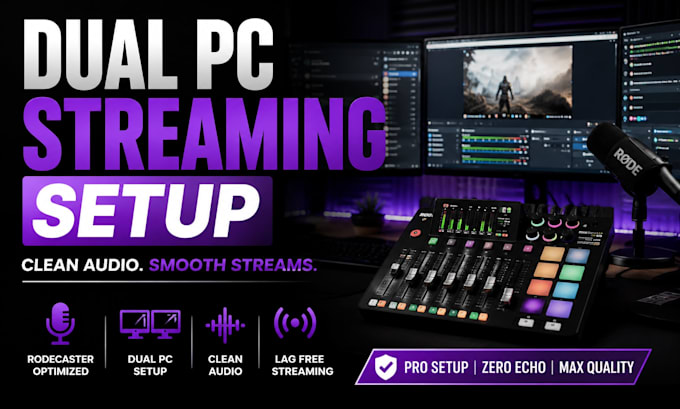
Take your dual PC streaming setup to the next level with a professionally configured RØDECaster Pro II. I will build a clean, reliable audio workflow that integrates seamlessly with OBS Studio, giving you crystal-clear sound and full control over every audio source.
Whether you're a streamer, gamer, podcaster, or content creator, I'll configure your RØDECaster Pro II for smooth dual PC streaming with optimized routing and low-latency performance.
What I'll set up:
Get a professional setup that delivers outstanding audio quality, stable performance, and a hassle-free streaming experience.
Software:
OBS Studio
Platform:
•
Twitch
•
YouTube
•
Mixer
Purpose:
Gaming
•
Music
•
Lifestyle
•
Business
•
News
•
Streamshare
•
Webinar
What do you need from me to get started?
You only need your PC setup details, streaming software (OBS or Streamlabs), and Rodecaster model. Screenshots or remote access can help speed up the setup process.
Can you setup dual PC streaming with OBS and Streamlabs?
Yes. Dual PC streaming setups are fully supported, including audio routing, sync optimization, clean mic setup, and lag-free streaming configuration.
Will this fix echo, delay, or poor audio quality?
Yes. Common issues like echo, static noise, delayed audio, low mic quality, and routing problems are diagnosed and optimized for cleaner sound and smoother streams.
How long does the setup usually take?
Most setups are completed within 24–48 hours depending on complexity. Advanced dual PC streaming systems or custom audio routing may require additional time.
Do you provide support after delivery?
Yes. Support is included to make sure everything runs properly after setup. Extended support and advanced optimization can also be added for larger streaming setups.
Can you optimize my setup for Twitch, YouTube, or Kick?
Absolutely. Your OBS Studio or Streamlabs setup can be optimized specifically for Twitch, YouTube, Kick, podcasts, or gaming streams to improve quality and stability.
Can you help with advanced streaming setups?
Yes. Advanced services such as multi-platform streaming, podcast audio optimization, GoXLR integration, scene setup, and stream performance tuning are also available.
| (2) | ||
| (0) | ||
| (0) | ||
| (0) | ||
| (0) |

myunghaselin134

Netherlands
Thank you for your time very satisfied. Until the next time.
$100-$200
Price
8 days
Duration
got2begucci

United States
Cynthia was able to get my sound working again even though it was under a different program. She had made a suggestion so i will continue to use it. She is going to come back in and fine tune my sound quality so i have a quality live stream.
$50-$100
Price
1 day
Duration
| (2) | ||
| (0) | ||
| (0) | ||
| (0) | ||
| (0) |
myunghaselin134
Netherlands
Thank you for your time very satisfied. Until the next time.
$100-$200
Price
8 days
Duration
got2begucci
United States
Cynthia was able to get my sound working again even though it was under a different program. She had made a suggestion so i will continue to use it. She is going to come back in and fine tune my sound quality so i have a quality live stream.
$50-$100
Price
1 day
Duration
