Browse categories
Explore
Fiverr Pro
English
$
USD
Excel Expert in Dashboards, Automation, and data visualization
I will create a customized Excel Attendance Tracker or convert your PDF to clean Excel format with 100% accuracy.
Features of the Tracker:
Auto Attendance Status (Present/Absent)
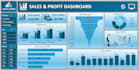
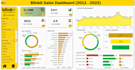
Monthly & Department-Wise Dashboard
KPI Cards: Overall % Attendance, Top/Low Departments
Interactive Charts: Donut, Pie, Line, Bar
Slicers/Filters for dynamic analysis
Conditional Formatting for highlights
Neatly formatted, error-free formulas
Excel Formulas & Tools I Use:
XLOOKUP, SUMIF, IF, AND/OR, INDEX,CHOOSE, FILTER, NETWORKDAYS, Conditional Formatting, PivotTables, Charts & Graphs
Also included:
PDF to Excel (non-scanned PDFs)
Excel to PDF
Clean formatting & structured layout
I deliver with speed, accuracy, and visual clarity. Revisions included. Let's make your spreadsheet work smarter not harder.


Platform:
Excel
•
Google Sheets
•
Microsoft Office
Development technology:
Excel
•
VLOOKUP
•
Other
Expertise:
Formatting
•
Pivot tables
•
Formulas
•
Charts
•
Cleaning
What details do I need from you to start the work?
I need your source file (Excel or PDF), a clear description of what you need (like tracker type, dashboard layout, or specific formulas), and any design or formatting preferences you have. This helps me deliver exactly what you expect.
Can you create a customized Excel dashboard for my data?
Yes! I design clean, interactive dashboards with KPI cards, charts, slicers, and summaries based on your data and specific requirements.
Can you convert scanned PDFs to Excel?
No, I only work with non-scanned (editable) PDF files to ensure accurate and clean conversions.
Do you use Excel formulas and conditional formatting in trackers?
Yes, I apply advanced formulas like XLOOKUP, IF-OR, SUMIF, COUNTIF, and also use conditional formatting to highlight important data automatically.
Will you include charts or graphs in the dashboard?
Definitely! I can add bar charts, pie/donut charts, line charts, and pivot-based visuals to make your data more insightful and easy to understand.
Will the converted files be editable?
Yes, Excel files converted from non-scanned PDFs will be fully editable - you can filter, format, and formulas. However, PDFs generated from Excel will be in a non-editable format, suitable for viewing and sharing.


