Browse categories
Explore
Fiverr Pro
English
$
USD
Spreadsheet Cleanup Specialist
Excel can format the display of values, but it can't fix text-based formatting inconsistencies in your data. If your spreadsheet has:
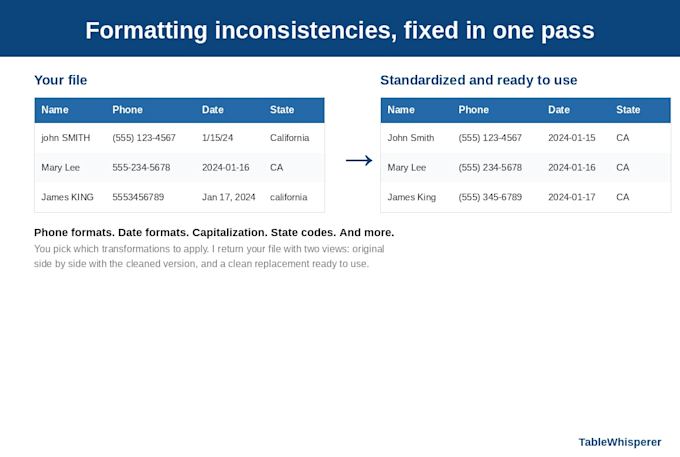
* Phone numbers in mixed formats (555) 123-4567, 555-123-4567, 5551234567
* Dates in mixed formats 1/15/24, January 15, 2024, 2024-01-15
* Mixed-case names, emails, or city names
* State names mixed with abbreviations California vs CA
* ZIP codes inconsistent some with +4, some without
* Hidden characters, smart quotes, or weird whitespace from pasted data
* LLC, L.L.C., llc same company written different ways
...Find/Replace won't fix this in one pass. This gig does.
You pick which transformations to apply and the target formats. There's also one global choice: do you want abbreviations or full words for things like KY vs Kentucky, LLC vs Limited Liability Company, Apt. vs Apartment.
I return your file with two views: original alongside standardized columns for verification, and a clean replacement version ready to drop into your downstream system.
Excel and CSV both supported. Output matches your input format. File metadata preserved.
Your file is processed for your order and deleted after delivery for privacy and security.

What does "100 rows cleaned" mean?
Nothing - It's a Fiverr bug. The field can't be turned off or changed for this kind of listing.
What kinds of inconsistencies can this fix that Excel can't?
Anything where the same data appears in different shapes: phone format mismatches, dates as text in mixed formats, mixed-case names/emails, state names vs abbreviations, ZIP +4 inconsistencies, hidden characters, LLC variations. Find/Replace fixes one pattern at a time; I fix them all in one pass.
Do you accept CSV files as well as Excel?
Yes, .xlsx and .csv are both supported. The output matches the format you sent: Excel in, Excel out (one file with two tabs); CSV in, CSV out (separate files for the comparison and cleaned versions, zipped together).
What does "Excel values" vs "text strings" mean for dates and currencies?
Dates and currencies can be stored as real Excel values (formatted to display how you want; good for sort and math) or as text strings (literal text like "01/15/2024"; good for import to systems that expect strings). You pick once; it applies to all your dates and currencies.
What if my file is bigger than the base pricing covers?
The base price covers up to 10 columns and 100,000 rows. Beyond that, the listing has add-ons: +$5 per 5 extra columns and +$5 per extra 100,000 rows. If your scope is much larger than the add-ons cover, message me first and I'll quote a custom order.
Can I pick just a few transformations, or do you do everything?
You pick exactly what you want from the intake checklist. Nothing is applied by default. If you want only phone-number standardization and nothing else, check just that one box.
Does this gig also remove duplicates?
No, this gig transforms formatting in place without changing row count. If you also need duplicates removed, my separate deduplication gig handles that and includes its own standardization step. You can pair the two gigs if you need both.
What if I'm not satisfied with the result?
Message me and I'll fix it.
