Browse categories
Explore
Fiverr Pro
English
$
USD


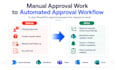


I help EU and international businesses create or improve SharePoint approval workflows using Microsoft Power Automate.
If your team handles requests, approvals, sign-offs, purchase requests, or status updates manually, I can turn that process into a clearer Microsoft 365 workflow.
What I can help with:
Build a SharePoint approval workflow
Fix an existing broken approval flow
Route requests to the right approver
Update SharePoint status fields automatically
Send Teams or Outlook notifications
Create outcomes such as Approved, Rejected, or Pending
Add simple conditions and branching logic
Test the workflow with sample data
Document how the workflow works
Best for purchase requests, leave requests, document reviews, task approvals, onboarding requests, and simple business approvals.
Why work with me:
I am based in Denmark and work in a European timezone. I help clarify the business process, build the automation, test it, and document how it works so your team is not left with a black box.
I do not build spam, scraping, cold outreach, or non-compliant automations.
Please message me before ordering if you are unsure which package fits your workflow.
Power Automate and Microsoft 365 Workflow Automation Specialist
Languages
Do I need to contact you before ordering?
Yes, please message me first if you are unsure which package fits. I will quickly confirm the approval process, Microsoft 365 tools involved, required access, and whether your setup supports the workflow.
Which Microsoft tools can you work with?
For this gig, I mainly work with SharePoint, Power Automate, Microsoft Teams, Outlook, Microsoft Forms, and Microsoft 365 approval workflows.
Can you fix an existing broken approval workflow?
Yes. The Basic package is for reviewing or fixing one existing SharePoint approval flow. I will check the trigger, approval step, conditions, status updates, and explain what was changed.
Which package should I choose?
Choose Basic if you need one existing flow reviewed or fixed. Choose Standard if you need one simple approval workflow built. Choose Premium if you need branching, multiple outcomes, notifications, status updates, testing, and documented handover.
Are premium connectors included?
No paid Microsoft licenses or premium connector costs are included. If your workflow requires premium connectors, Dataverse, custom connectors, or extra licensing, I will tell you before startin
What is not included in this gig?
I do not build spam, scraping, cold outreach, or non-compliant automations. This gig is for internal Microsoft 365 business approval workflows such as purchase requests, leave requests, document reviews, and task approvals.
Will you document the workflow?
Yes. Standard and Premium packages can include a short handover explaining the trigger, approval logic, status updates, notifications, and how to test the workflow.


