Browse categories
English
$
USD
Connect to your AI


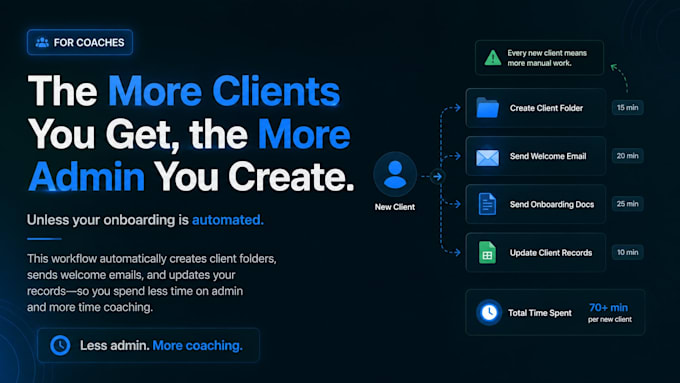
Every new coaching client should feel like an opportunity not another list of repetitive admin tasks.
For many coaches, onboarding still means manually creating folders, sending welcome emails, organizing client records, and sharing onboarding resources.
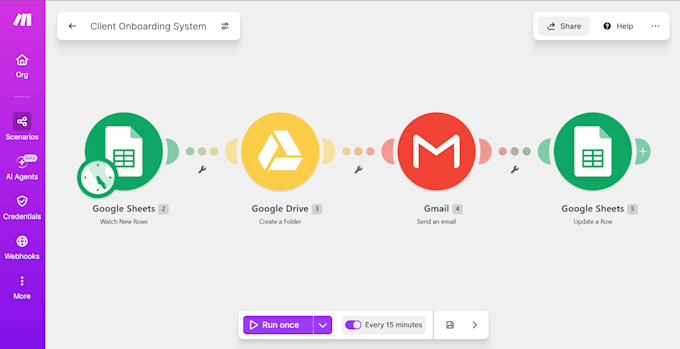
So I built a workflow that automates those repetitive steps.
Creates a client folder automatically
Sends a personalized welcome email
Updates onboarding records
Keeps client information organized
This workflow can also be extended to automatically send contracts, onboarding guides, worksheets, payment instructions, or notify your team so the process fits your coaching business instead of the other way around.
Want to see how a workflow like this could work for your coaching business?
CHECK OUT MY NOTION PAGE:
https://tinyurl.com/3uxvt8b2
AI Automation and Workflow Builder
Languages
What is client onboarding automation, and how can it help my coaching business?
Client onboarding automation streamlines repetitive tasks after a new client joins your coaching program. It can automatically organize client information, create folders, send personalized welcome emails, and update records, helping you save time and deliver a smoother onboarding experience.
What tasks can you automate in my client onboarding process?
I can automate tasks such as creating client folders, sending personalized welcome emails, organizing client information in Google Sheets, and sharing onboarding resources. Additional steps can be discussed based on your business requirements.
Which tools do you use to build client onboarding automations?
I primarily use Make.com, Google Forms, Google Sheets, Google Drive, and Gmail. The exact tools depend on your existing workflow and the integrations your business needs.
Can you customize the onboarding workflow for my coaching business?
Absolutely! Every coaching business has a different onboarding process. I will customize the workflow according to your requirements, preferred tools, client journey, and existing business processes.
Can you integrate contracts, onboarding guides, worksheets, or payment instructions?
Yes! I can help automate the delivery of existing contracts, onboarding guides, worksheets, and payment instructions, provided the required documents and supported integrations are available. Additional functionality may require a custom offer.
Do I need to have a Make.com account or other software subscriptions?
You may need accounts with Make.com and the relevant Google services. Some platforms or advanced integrations may require paid subscriptions. I will let you know about any additional costs before implementation.
What information do you need from me to get started?
I will need a brief explanation of your current onboarding process, the tools you use, the tasks you want to automate, and access to the relevant accounts or integrations. You should also provide any welcome email templates, documents, or onboarding resources you want included.
Will you test the automation before delivering it?
Yes! I will test the agreed workflow to check that the automation steps work as expected and that the information flows correctly between the connected applications.
Do you provide support if something goes wrong after delivery?
Yes! I provide support for issues related to the delivered workflow within the agreed support period. New features, additional integrations, or changes beyond the original scope may require a separate order.