Browse categories
English
$
USD
Connect to your AI


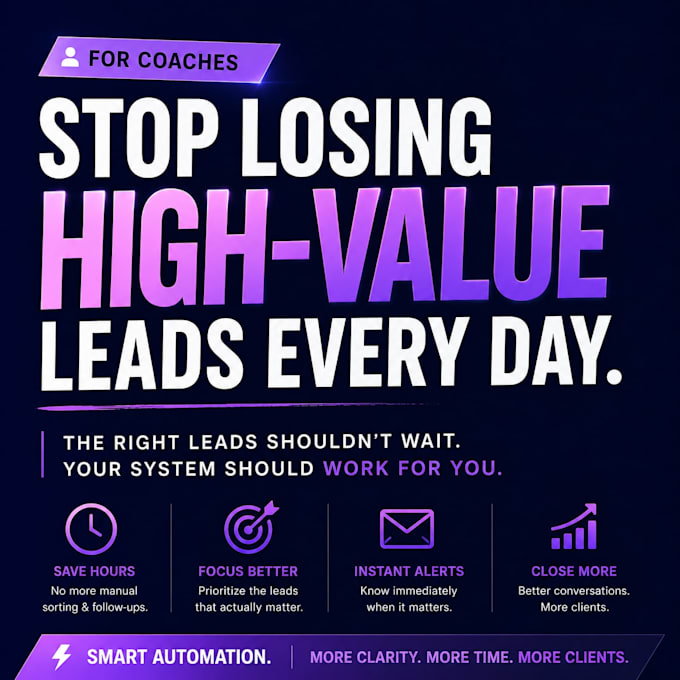
Most coaching businesses don't have a lead generation problem.
They have a lead prioritization problem.
Every new inquiry ends up in the same spreadsheet.
That means:
So I built an automation that helps solve this.
Here's what it does:
The goal isn't to replace your current workflow.
It's to automate the repetitive parts using the tools your business already uses whenever possible.
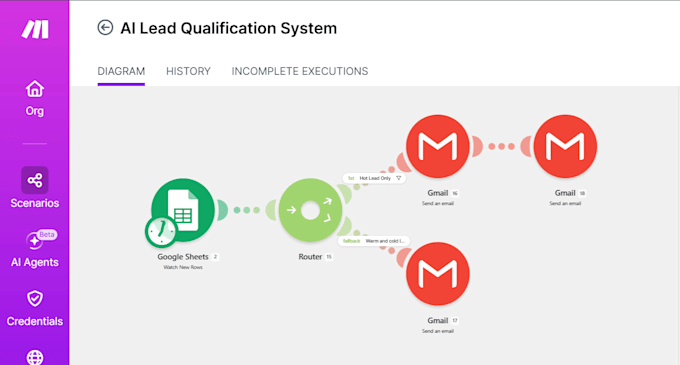
This project was built using Google Forms, Google Sheets, Make.com, and Gmail as a working demonstration, but the workflow can be adapted to fit different lead sources, scoring rules, and notification platforms.
CHECK MY NOTION FILE FOR MORE INFORMATION.
https://app.notion.com/p/AI-Lead-Qualification-System-for-Coaches-397f1324cabc80679832d3a9eb132
AI Automation and Workflow Builder
Languages
What is an automated Lead Qualification System?
It's an automation that evaluates incoming leads using your predefined criteria, assigns scores, categorizes them as Hot, Warm, or Cold, and helps you prioritize follow-ups.
How does the lead scoring system work?
The system assigns points based on your chosen qualification criteria, such as budget, goals, interest level, or other relevant factors. Leads are then categorized according to their total scores.
Can I customize the lead scoring criteria?
Yes! I can configure the scoring rules and qualification criteria based on your coaching business, target audience, and ideal client profile.
Will I receive notifications when a Hot Lead arrives?
Yes! The system can automatically send an email notification when a lead meets your Hot Lead criteria. It can also send confirmation emails to applicants.
Which tools do you use to build this automation?
I primarily use Google Forms, Google Sheets, Make.com, and Gmail. Other lead sources or notification platforms may be possible depending on integration compatibility.
Can you connect my existing Google Form and Google Sheets?
Yes! I can work with your existing Google Form and Google Sheets, provided they are compatible with the workflow. Otherwise, I can help set up new ones.
Do I need a Make.com account?
Yes. You'll need a Make.com account to run the automation. You can start with the free plan, depending on your usage. Any paid subscription, if required, is your responsibility.
Do you need my Google password or sensitive login information?
No. I will never ask for your password, OTP, or sensitive login credentials. Required account access should be provided through official and secure authorization methods. All communication and payments will remain on Fiverr.