Browse categories
Explore
Fiverr Pro
English
$
USD
Level 1


Supercharge your business with a custom AI Chatbot built in Microsoft Copilot Studio!
I will design and deploy a smart, reliable chatbot or virtual agent that integrates seamlessly into your Microsoft Teams or Office 365 environment empowering your staff, customers, or field teams to get answers and automate tasks in seconds.
What I offer:
Custom AI chatbot flows (Q&A, forms, data retrieval, and more)
Multiple topics and actions for rich, interactive conversations
Connect multiple data sources as a knowledge base (SharePoint, Dataverse, SQL, and more)
Integration with Power Automate for advanced workflows
Teams-ready deployment and configuration
Prebuilt templates tailored to your business needs (support desk, technician guide, HR FAQs, etc.)
Easy-to-maintain and scalable solutions
Why choose me?
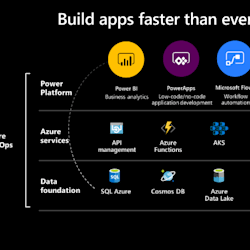
️ Microsoft Power Platform Specialist
️ Experience with enterprise-grade Copilot Studio deployments
️ Clear communication & post-delivery support
️ Solutions optimized for real business workflows (not just demos)
Whether you need an HR helpdesk bot, a field technician assistant, or a knowledge base agent Ive got you covered!
Lets make your operations smarter message me to get started!
Expert in building custom solutions using the Power Platform and Jira
Level 1
Languages
Do I need a Microsoft 365 account to use the chatbot?
Yes — you’ll need an active Microsoft 365 tenant with Copilot Studio (Power Virtual Agents) enabled. I can guide you on setup if needed.
Can the chatbot connect to my company’s data?
Absolutely. Your bot can connect to multiple data sources like SharePoint Lists, Dataverse, SQL, and other Microsoft 365 services to act as a dynamic knowledge base.
Will the chatbot work on Microsoft Teams?
Yes — your chatbot will work seamlessly on Teams (desktop and mobile). I handle the full Teams deployment for you.
Can the chatbot automate tasks and workflows?
Yes — using Power Automate, I can integrate workflows such as sending emails, updating lists, managing approvals, and more directly from the chatbot.
Can I update and maintain the chatbot myself after delivery?
Yes — I build easy-to-manage solutions. I can also provide a short training session or documentation to help you maintain and update it confidently.
What if I don’t know what topics or actions I need?
No problem! I offer a free consultation to help map out your business needs and recommend the best chatbot topics and actions.
Can you integrate third-party apps or APIs with the chatbot?
Yes — through Power Automate, I can integrate many third-party services supported by Microsoft connectors or custom APIs.


