Browse categories
Explore
Fiverr Pro
English
$
USD



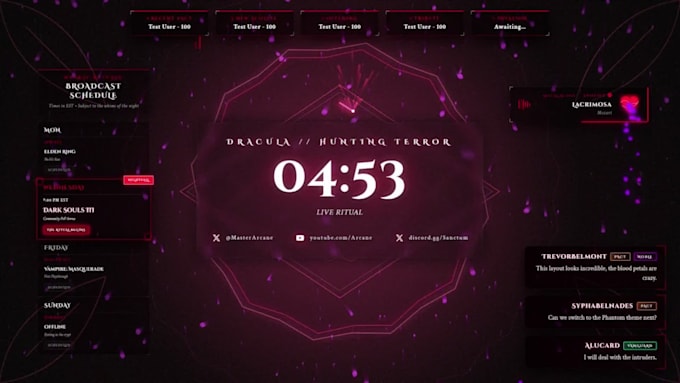
Tired of heavy video overlays lagging your stream and spiking OBS CPU usage?
I code lightweight, responsive stream widgets using HTML5, CSS3, and JavaScript. Instead of bulky video loops, you get sharp, 60 FPS graphics rendering natively inside OBS Studio, StreamElements, or Streamlabs with zero frame drops.
What I Build:
Why Choose Coded Widgets?
Packages:
Message me before ordering to discuss your custom setup!
Please inform the freelancer of any preferences or concerns regarding the use of AI tools in the completion and/or delivery of your order.
Interactive Stream Overlays and Web Development
Languages
Will this work on OBS Studio and Streamlabs Desktop?
Yes! I code these as standard HTML widgets. You simply copy the widget URL from StreamElements and paste it into OBS as a "Browser Source." It works instantly on any streaming software.
Do I need to know how to code to use this?
Not at all! I handle 100% of the coding. I will give you a simple text file and a short guide showing you exactly where to copy and paste the code into StreamElements. It is incredibly easy.
Do you make Twitch extensions or Twitch Panels?
For this gig, I only focus on on-screen widgets (Alerts, Chat Boxes, Goals) that run through StreamElements/Streamlabs. I do not code Twitch extensions or draw static profile panels.
Can you match my current VTuber or channel aesthetic ?
Absolutely. Send over your logo, channel assets, and color codes, and the entire widget will be styled to match your existing brand aesthetic
Which package should I choose?
Basic ($25): 1 single utility widget (e.g., custom Chat Box, Event Ticker, or Cam Frame) + its dedicated control panel. Standard ($60): 1 dynamic, interactive system (e.g., Multi-Event Alerts with sound sync OR an Interactive Goal Bar) + simulation control panel. Premium ($120): Either a matched 3
Does the Premium tier include all 15+ widgets in your portfolio?
No. The Premium tier includes 3 core synchronized widgets of your choice OR 1 complex engine (such as a full Subathon system). If you want the complete mega-bundle of 15+ widgets with the unified Master Control Dock, send me a message for a custom quote tailored to your channel.