Browse categories
Explore
Fiverr Pro
English
$
USD



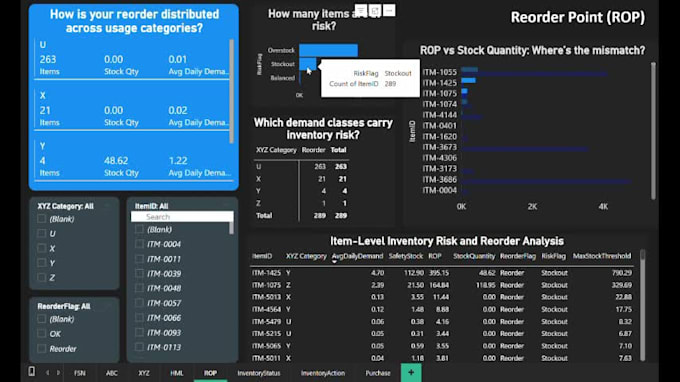
Make smarter inventory decisions with a dynamic Power BI dashboard built for inventory management, procurement teams, and supply chain professionals.
This interactive procurement dashboard transforms raw stock data into clear, actionable insights. Its compatible with Excel, CSV, Google Sheets, and ERP exports.
Start optimizing your inventory today
Why It Works
Please contact!
Power BI, Excel, Access and Power Query Expert: Business Dashboards
Languages
Is this compatible with my Excel inventory tracker or ERP data?
Yes. The dashboard is designed to connect with Excel, CSV, Google Sheets, or ERP export files. I’ll format your data for seamless integration.
How are the 9 Purchase Groups determined?
They’re based on a combination of ABC, FSN, XYZ, and HML logic. Each group reflects a specific procurement strategy—like critical items, slow movers, or stock clearance candidates.
Can I download purchase suggestions or overstock lists?
Yes. The dashboard includes exportable tables for purchase recommendations, overstock, dead stock, and more—ready for download and action.
Is this dashboard suitable for non-technical users?
Absolutely. It’s built with clean visuals, dropdown filters, and intuitive navigation. No coding or Power BI experience is required to use it.
Can I update the dashboard myself after delivery?
Yes. You’ll receive a PBIX file. You can refresh data, adjust filters, or extend logic. I also offer support or upgrade packages if needed.
What is the typical delivery time, and can you handle urgent orders?
The standard delivery time depends on the package you choose—typically 4 to 7 days. If you have a tight deadline, I can often accommodate urgent requests with prior notice. Please message me before ordering so we can align on your timeline and data readiness.
Will I receive a PBIX file I can edit later?
Yes. You’ll receive a fully editable PBIX file. You can refresh data, adjust filters, or extend logic as needed.
Does this dashboard include interactive visuals and dropdown filters?
Yes. It’s built with interactive charts, dropdown filters, and intuitive navigation—ideal for non-technical users.
Does this dashboard include stock optimization logic?
Yes. It uses ABC, FSN, XYZ, and HML analysis to identify excess, dead, and slow-moving stock. The dashboard includes logic to reduce blocked capital and improve inventory turnover.
Can this dashboard help reduce stockouts and excess inventory?
Yes. The dashboard includes stock optimization logic and reorder point analysis to help you maintain ideal stock levels, reduce blocked capital, and avoid stockouts.