Browse categories
English
$
USD
Connect to your AI
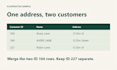
Two customers can share an address. One customer can appear under two spellings. Before I merge anything, I ask what one row should represent for your business.
I clean Excel and CSV customer lists for mailings, CRM imports and everyday follow-up. I standardize names, addresses and phone formats, remove confirmed duplicates using your rules, and flag uncertain matches for your decision.
Every order includes a cleaned file, a count of rows received and retained, and a list of questionable matches if any turn up. I work from a copy of your original.
Choose Single List Cleanup for one list up to 100 rows. Two List Merge covers up to 1,000 total rows across two lists. Mailing List Prep covers up to 3,000 total rows across four lists and adds household grouping or exclusion-list matching plus an export in your requested layout.
Have a larger file or unusual matching rules? Send the column headings and a few fictional example rows so I can scope it before you order.

How do you decide which rows to merge?
We agree on a rule such as matching customer ID or matching name and address. Similar names, conflicting details and shared addresses are flagged for review unless your instructions resolve them.
What counts toward the row limit?
Count all input data rows across the sheets or files you send, including any exclusion list. Header rows do not count.
What files can I send and what will I receive?
Send XLSX or CSV files. I return a cleaned Excel workbook with a short reconciliation and any uncertain matches. If you need a CSV for import, include your required column order.
Can you verify addresses or find missing contact information?
I standardize and reconcile the information you supply. External address verification, contact research and email deliverability testing are separate services outside this Gig.
What does a revision cover?
I can adjust the cleanup or layout using your original files and agreed rules. New files or a new matching rule may need a separate quote.