Browse categories
English
$
USD
Connect to your AI

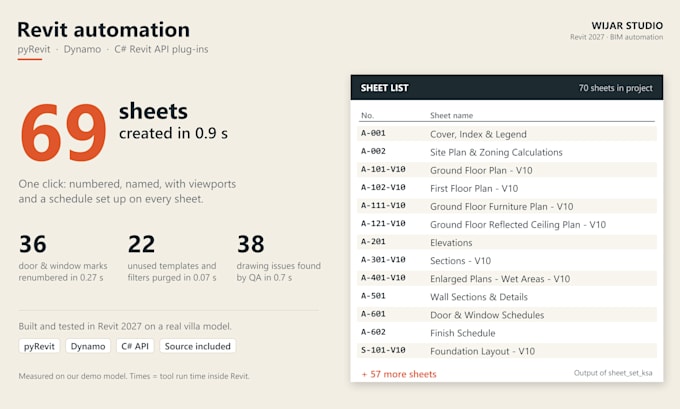
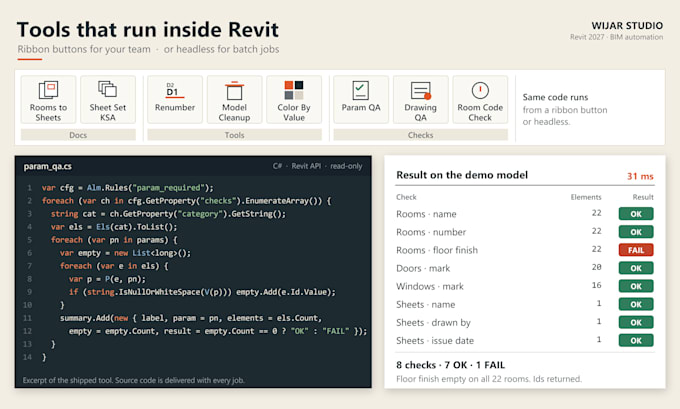
If you do it by hand in Revit every week, it can be a button.
We build Revit automation that runs on real projects: Dynamo graphs, pyRevit tools and C# Revit API add-ins. Every tool is tested on a real model before delivery.
WHAT WE AUTOMATE
INCLUDED
WHY WIJAR STUDIO
BEFORE YOU ORDER
Message us with the task step by step (screenshots help), your Revit version, and a small sample model. Big tools or company-wide add-ins: ask for a custom offer.
Architectural studio for Revit BIM, renders, interiors, brand and print
Languages
Which Revit versions do you support?
2022 to 2027. One version is included; more versions are available as an extra.
Do I get the source code?
Yes, always. You get the full source code and a short usage guide with every package.
Will the tool change my model without asking?
No. Our tools run a preview first and write all changes in one transaction that you can undo.
Dynamo or pyRevit, which one is better for me?
pyRevit for buttons your team clicks every day; Dynamo if your team already works with graphs.