Browse categories
English
$
USD
Connect to your AI
AI Phone Receptionist and Website Chat for Local Businesses
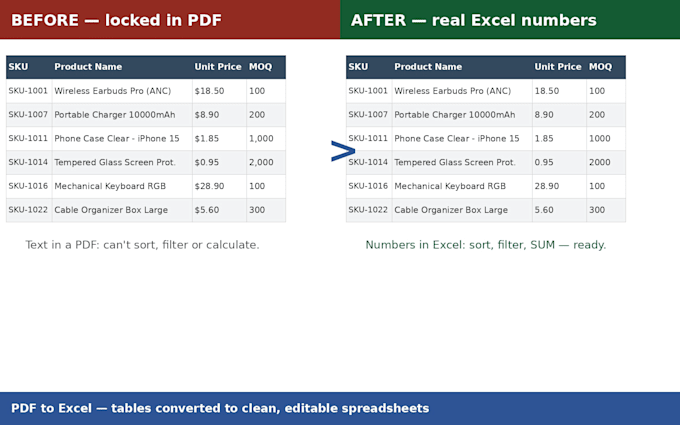
A table inside a PDF is data you cannot use - you cannot sort it, filter it, or run a single calculation on it. I convert PDF tables into clean Excel spreadsheets where prices are real numbers, quantities are real numbers, and the sheet is ready to work with the moment you open it.
Typical jobs: supplier price lists, invoices, bank or sales statements, catalog tables, reports.
What you get:
- Every table extracted and merged into one continuous sheet (no repeated header rows in the middle)
- Columns typed correctly: currency as currency, quantities as numbers, dates as dates
- Filters on every column and a frozen header row
- Blank or unreadable cells flagged in a delivery note - never guessed, never filled in silently
This is a structured extraction, not a raw export to Excel dump: the output is checked row by row against the PDF. See the gig gallery for a before/after: a 3-page supplier price list (24 products) converted into one clean, filterable sheet.
Works with native (digital) PDFs. For scanned PDFs, message me first - I will tell you honestly whether the scan quality is good enough before you order.
Convert from:
Convert to:
XLS, XLSX
What kind of PDFs work best?
Digital PDFs (created from Excel, Word, an ERP or a web export) convert most accurately. Scanned PDFs can work too if the scan is sharp - send me the file first and I will confirm before you pay.
Will the numbers be real numbers or text?
Real numbers. Prices, quantities and dates are typed during conversion, with currency formatting applied - SUM, sorting and filtering all work immediately.
What if the PDF has several tables or the table spans many pages?
That is the Standard and Premium scope: tables are merged into one sheet and repeated page headers are removed. Separate sections can go on separate sheets if you prefer.
What if some cells are blank or unclear in the PDF?
They are left blank in the Excel file and listed in the delivery note, so you can verify them against your source. I do not guess values.
Can you deliver in Google Sheets or CSV instead?
Yes - the XLSX imports into Google Sheets cleanly, and I can include a CSV copy on request at no extra charge.
